Fortifying Docker: Security Deep Dive & SIEM Integration for Proactive Defense
As businesses increasingly rely on containerized environments for scalability and efficiency, Docker has become a cornerstone of modern application deployment. However, security challenges persist, demanding a proactive approach to safeguard infrastructure.
In our previous blog, Docker Demystified: Laying the Foundation for a Secure Containerized Future, we covered Docker fundamentals, its architecture, and steps to get started.
In Part 2, we shall take a deeper dive into Docker security solutions focusing on threat mitigation strategies, best practices, and docker SIEM integration for real-time protection.
Deploying Docker in production introduces real users, real data, and real security risks. Unlike development, where bugs are minor setbacks, production issues can lead to major disruptions and reputational damage.
A single misconfigured container or exposed API can compromise trust and security. That's why robust security measures are essential not just as best practices but as a necessity for business survival. Let’s first understand the security challenges of Docker.
Docker Security Challenges: A Quick Rundown
a. Unverified Docker Images
Pulling images from untrusted sources can expose your system to vulnerabilities or hidden malware. For Example: A team once built an app on an outdated Alpine image until a security scan found more CVEs than features.
Practice 1: Always use verified, official images, scan them regularly, and keep them updated.
b. Privileged Containers
Running containers with privileged grants full access to the host system, posing serious security risks.
Result: It can mess with your network settings or even mount sensitive files like /dev/sda.
Practice 2: Instead, use --cap-add to assign only necessary permissions.
c. Poor Secrets Management
Hardcoding passwords or tokens in Docker files or environment variables (docker run -e DB_PASSWORD) makes sensitive data vulnerable.
Practice 3: Use dedicated secrets management tools and avoid exposing credentials in containers.
d. Weak Container Isolation
Without proper user namespaces and network restrictions, containers can access the host system or unintended services.
Practice 4: Isolate containers effectively and configure networks securely.
e. Bloated Images and Vulnerability Risks
Large images introduce unnecessary components that increase the attack surface.
Practice 5: opt for minimal, lightweight images to reduce vulnerabilities and improve performance.
f. Inefficient Container Lifecycle Management
Containers should be ephemeral keeping unused containers running increases security risks.
Practice 6: Regularly rotate containers, update them, and remove outdated instances.
g. Lack of Docker Logging and Monitoring
Without proper monitoring, security incidents can go unnoticed.
Practice 7: Implement logging and monitoring solutions to detect anomalies and respond to threats in real time.
To enhance Docker security beyond standard best practices, integrating it with SIEM solutions like Wazuh is a powerful approach.
Elevating Your Docker Security with Wazuh
With Wazuh, you can continuously track Docker logs, detect security anomalies, and receive alerts for suspicious activity. This provides a comprehensive security posture, allowing you to monitor your Docker environment in real-time. With proactive monitoring, you can safeguard your containers and ensure they remain secure against evolving risks. Here’s how you can integrate Wazuh with Docker.
A Step-by-Step Guide to Integrating Docker and SIEM
Integrating Docker with a Security Information and Event Management (SIEM) system enhances visibility into containerized environments, making monitoring and threat detection more effective. Follow this structured approach:
Step 1: Install and Configure Docker
- Install Docker on your host system.
- Ensure the Docker daemon is properly configured to align with security and performance requirements.
- Enable the necessary logging drivers that your SIEM solution supports.
Step 2: Set Up Your SIEM Solution
- Choose a SIEM solution that supports Docker log formats.
- Configure its ingestion pipeline to handle Docker logs efficiently.
- Ensure that relevant log sources, such as container runtime events and application logs, are captured.
Step 3: Configure Docker Logging for SIEM
- Modify Docker’s logging driver settings to forward logs to the SIEM platform. This is typically done by setting a supported logging driver such as syslog, json-file, fluentd, or splunk.
- Ensure appropriate log retention policies and filtering are applied to maintain efficiency.
- Test log forwarding by running sample container workloads.
Step 4: Validate the Integration
- Generate events within Docker, such as starting, stopping, or creating containers.
- Verify that the SIEM system successfully ingests and processes the logs.
- Optimize log parsing, correlation rules, and alerts within SIEM to improve detection accuracy.
- Regularly audit and refine the setup to accommodate changes in security needs.
Steps for Container Monitoring with Wazuh
Wazuh provides two flexible approaches for Docker monitoring:
- Full Docker Host Monitoring: Collect logs and security events from the entire Docker daemon and all its containers.
- Per-Container Monitoring: Collect logs and metrics from individual containers for targeted analysis.
Choose Your Monitoring Scope as either Entire Docker Host or Specific Containers. As a first step, we will focus on monitoring the entire Docker host to centralize logs and events from all running containers. This approach is ideal for broad visibility into container activity, security posture, and performance metrics. Once configured, the logs will appear on the Wazuh dashboard, offering real-time insights and alerting capabilities.
A. Global Docker Activity Monitoring
On the agent side, navigate to /var/ossec/etc/ossec.conf and insert the configuration as shown in the screenshot below.
- Restart the agent service using the command shown in the screenshot below.
- On the server side, navigate to /var/ossec/etc/ossec.conf and insert the configuration as shown in the screentshot below.
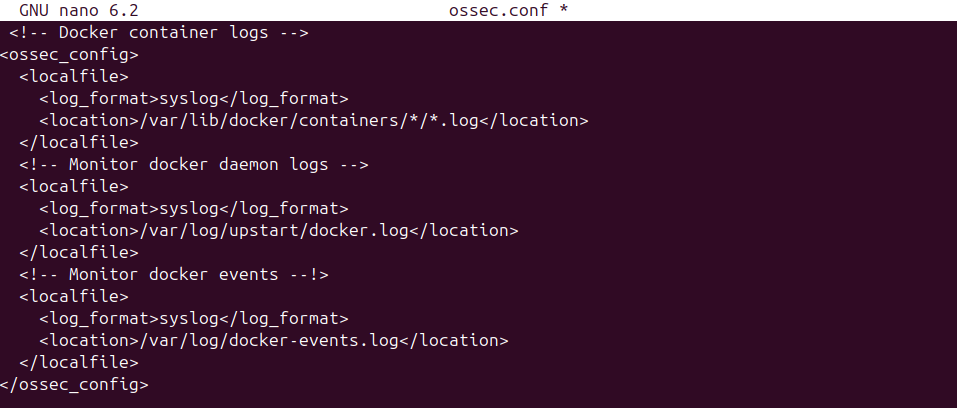
- In the server side, navigate to:
/var/ossec/etc/shared/<group_name>/agent.conf
Ensure that the group contains the Docker server agent.
Then, add the configuration as shown in the screenshot provided. This applies the desired settings to all agents in that group.
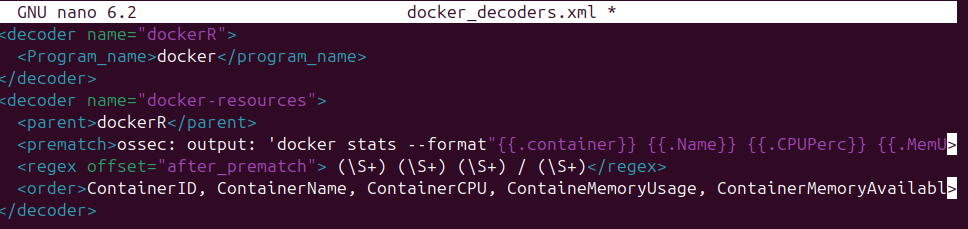
- Next, we need to create a custom decoder so that Wazuh can properly parse the Docker logs and extract meaningful fields for analysis
- We need to create a custom rule to generate alerts from the parsed logs, based on the format shown in the screenshot.
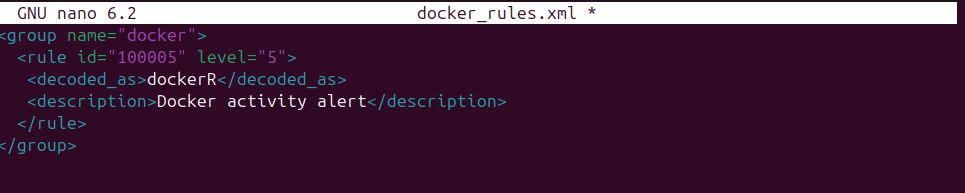
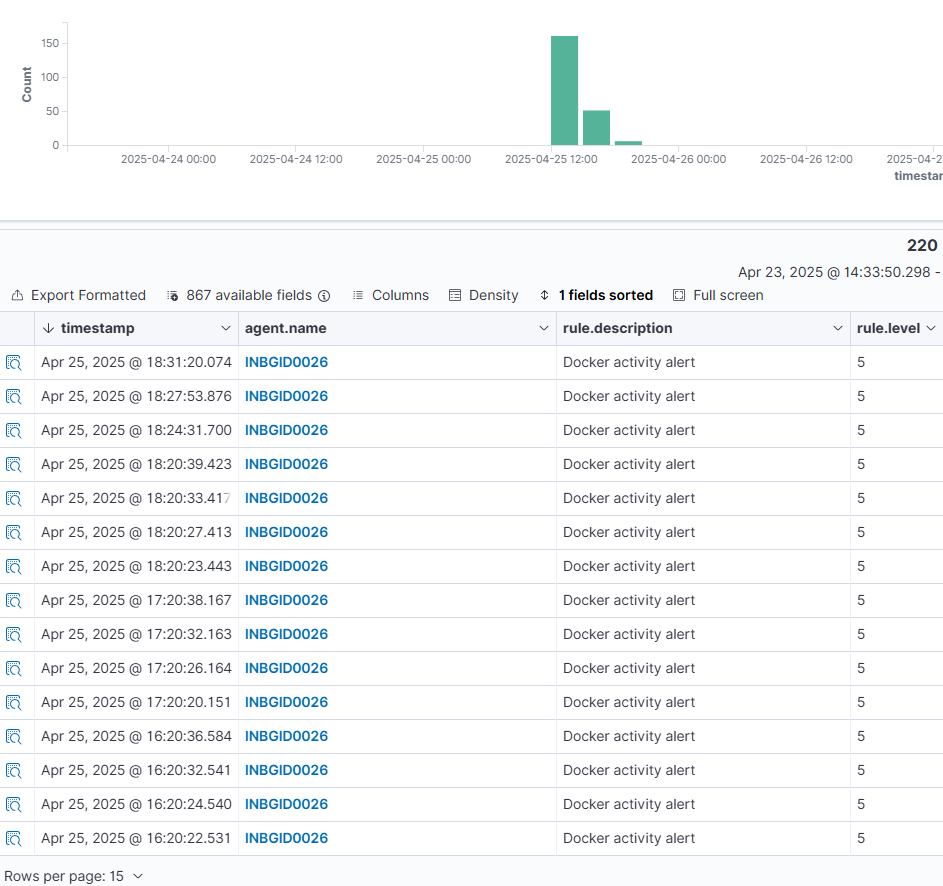
- Now the logs are visible as alerts on the Wazuh dashboard. This confirms that all Docker logs are being continuously forwarded to the Wazuh server without interruption, enabling effective monitoring and analysis.
B. Docker Per-container Monitoring:
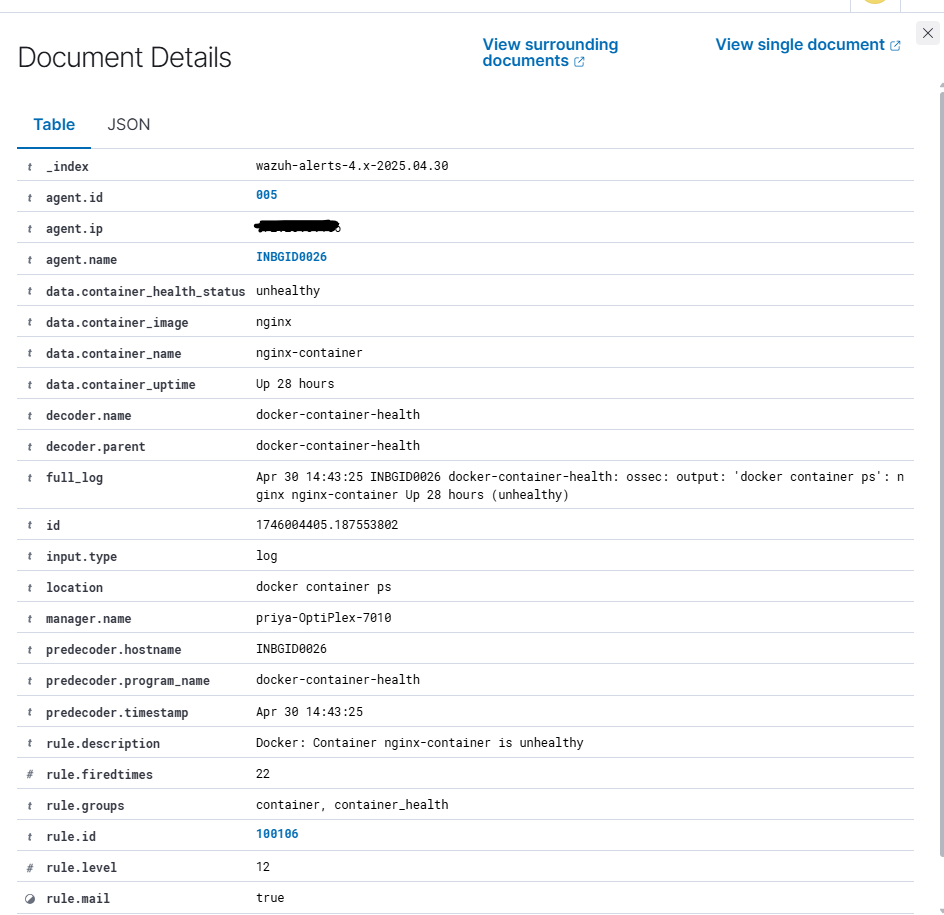
Now, we will focus on Per-container monitoring to capture logs and events from each individual running container. This approach provides granular visibility into the behavior, security status, and performance of specific containers. Once configured, the logs from each container will appear on the Wazuh dashboard, enabling targeted real-time insights and alerting capabilities.
Once the configuration is done you can see the alerts in wazuh – server.
Why Wazuh as Your Security Information and Event Management (SIEM) solution?
The Wazuh Security Information and Event Management (SIEM) solution is a centralized platform for aggregating and analyzing telemetry in real time for threat detection and compliance. Wazuh collects event data from various sources like endpoints, network devices, cloud workloads, and applications for broader security coverage.
Security Log Analysis
Wazuh consolidates, stores, and analyses security event data to detect anomalies and potential indicators of compromise. Its SIEM platform enriches alerts with contextual insights, streamlining investigations and accelerating response times for improved security efficiency.
Vulnerability detection
Wazuh detects vulnerabilities on monitored endpoints where you deploy the Wazuh agent. This speeds up your decision making and remediation process. The Wazuh vulnerability detection capability ensures you meet regulatory compliance requirements while reducing your attack surface.
Security Configuration Assessment
Wazuh Security Configuration Assessment can identify misconfigurations and security flaws in your infrastructure. Wazuh scans your systems against the Center for Internet Security (CIS) benchmark to allow you to identify and remediate vulnerabilities, misconfigurations, or deviations from best practices and security standards.
Regulatory Compliance
Wazuh facilitates regulatory compliance by enhancing visibility and automating security controls. It strengthens compliance through log analysis, incident response, and improved security mechanisms.
Its default ruleset supports multiple compliance frameworks, including PCI DSS, HIPAA, NIST 800-53, TSC, and GDPR. Wazuh's rules and decoders help detect attacks, system errors, security misconfigurations, and policy violations, ensuring organizations adhere to regulatory standards effectively.
Maintaining Docker SIEM integration
Proper maintenance of your Docker SIEM integration is just as crucial as its initial setup. Continuously monitor logs for unusual activity and fine-tune your SIEM’s alerting thresholds to ensure accurate threat detection. Incorporating a dedicated log management system alongside your SIEM can help manage data flow efficiently. This approach prevents your SIEM from becoming overloaded, allowing it to focus on identifying and responding to potential security threats.
Conclusion
As Docker moves from development to production, ensuring its security becomes increasingly vital where a single misconfiguration can lead to disruptions, data exposure, and compromised trust. It is crucial to be vigilant and use trusted images, restrict unnecessary container privileges, and consistently monitor activity to prevent vulnerabilities.
Securing containerized environments requires a proactive approach that balances efficiency with robust security measures. By understanding potential challenges, applying best practices, and leveraging SIEM solutions like Wazuh for real-time monitoring, organizations can significantly strengthen their security posture and mitigate evolving threats.

Advisory & Compliance Services
Audit & Assessment Services
Managed Security Services
Governance & Compliance Framework Development
Cyber Key Performance IndicatorsCISO Advisory
Advisory and Compliance ServicesStandard & Regulatory AdvisoryBusiness Continuity & Disaster Recovery PlanningIncident Response ReadinessData Privacy
Audit and Assessment Services
Cloud Security Assessment
Cyber Maturity Assessment
Privacy Impact Assessment
Red Teaming Service
VAPT
Managed Security Services
SOC as a Service
Third Party Risk Management
Vulnerability Management Services